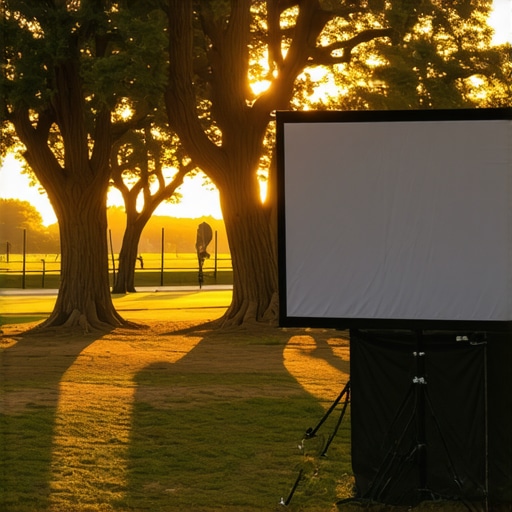
I’ll never forget the moment I set up my outdoor projector for a movie night under the stars, only to have the screen sag right in the middle, ruining what should have been a perfect experience. That sinking feeling of disappointment is all too familiar for anyone who loves outdoor cinema but struggles with portable screens. The truth is, many of us make simple mistakes—often out of inexperience—that turn incredible movie nights into frustrating messes.
Why Your Portable Screen Might Be Sabotaging Your Outdoor Movie Experience
Over the years, I’ve learned that the secret to a flawless outdoor showing isn’t just about the projector quality or the film choice. It’s about getting the basics right with your screen setup. Despite all the hype around 2026’s latest screen tech, tiny errors in how we handle pull-down screens or choose the right gain and placement can significantly impact image quality. These mistakes can cause glare, sagging, or even washout when the sun’s still up.
Is Your Screen Worth the Hype or Just a Letdown?
Early on, I bought a popular portable pull-down screen without researching its limitations. It looked great online, but in real life, I faced glare and sagging during my outdoor movie nights. That experience taught me a valuable lesson: not all screens are created equal, especially for outdoor settings with variable lighting conditions. For more on choosing the best screen for your environment, check out this guide on pull-down screens for bright rooms. And remember, understanding how to properly tension your screen can make all the difference—something I wish I knew earlier, as outlined in this tensioning hacks article.
With all these pitfalls, it’s no wonder many of us face issues that ruin our outdoor movie nights. But don’t worry—I’ve got your back. In the following sections, I’ll walk you through common mistakes and show you how to fix or avoid them, so your next outdoor screening is smooth, sharp, and truly memorable.
Secure Your Screen Properly
First, ensure your pull-down screen is firmly tensioned using the recommended hacks from this tensioning hacks article. I once tried to skip the tensioning step during my setup, leading to unwanted waves on the screen that distracted viewers. By tightening the tension with an extra pair of hands and following the proper steps, I achieved a flatter surface that dramatically improved image clarity.
Properly Position Your Screen for the Environment
Thresholding the placement is crucial: a too-low outdoor spot will be affected by ground reflections, while a too-high mount may catch wind. Align the screen edge at or just below eye level for sitting viewers, and avoid direct sunlight hitting the screen at any angle. During my last outdoor movie, I placed my fixed frame screen slightly off-center to avoid shadowing from nearby trees, which made a visible difference in brightness uniformity. Consider consulting this installation guide for more detailed tips.
Understand and Choose the Right Screen Gain
Screen gain refers to how much light the surface reflects. For bright outdoor settings, high-gain screens (over 1.5) can boost brightness but amplify hotspots—bright spots that wash out details. A common mistake is using a high-gain screen openly exposed to ambient light, which causes glare. I learned this firsthand when my previous high-gain screen exhibited hotspots during sunset, reducing contrast. To avoid this, select a screen with appropriate gain: these high-gain ALR screens offer excellent brightness with minimal hotspotting if properly installed.
Calibrate Your Projector and Screen Angle
Adjust the projector’s throw distance to match screen size and ensure the image is perfectly centered. Slight tilts can cause keystone distortions, so use a level to fine-tune the projector angle. When I mounted my projector for the first time, I neglected this step and ended up with a trapezoidal image. Using a keystone correction feature and adjusting the projector’s position helped me achieve a perfectly rectangular picture. Refer to this blueprint for comprehensive setup techniques.
Regular Maintenance and Adjustments
Keep your pull-down screen clean and free of dust, which can impair image quality. Periodically check the tension and re-tighten if necessary, especially after exposure to wind or moisture. During a recent outdoor event, I noticed slight waviness emerging after wind gusts. Re-tightening the tension restored a smooth surface and crisp image. Learning the nuances of tension control with these hacks ensured my setup remained pristine.
Optimize Ambient Light Conditions
Even with the best screen and setup, ambient light can undermine your viewing experience. Use blackout curtains or reposition the setup to minimize light pollution. When I faced glare from nearby streetlights, I used portable blackout screens around the projector area, which significantly increased contrast and color vibrancy. For outdoor environments, consider additional light control measures outlined in this guide.
Integrating these concrete steps into your outdoor cinema setup will translate into sharper images, improved brightness, and an overall cinematic experience that rivals indoor theaters. Mastering tension, positioning, gain, and environmental control is the key—every detail counts.
Many outdoor enthusiasts and home theater aficionados believe they’ve cracked the code on perfect projection, but in reality, most are navigating a maze of misconceptions that can sabotage their setup. One pervasive myth is that higher screen gain always translates to brighter images. While high-gain screens, like those showcased in this guide explain, can amplify brightness, they often come with hotspots and reduced viewing angles — issues overlooked by beginners eager for maximum luminance. So, chasing after the highest gain might actually diminish your overall experience.
Another common mistake involves fixed frame screens versus pull-down options. Many assume fixed frames are superior due to their rigidity, but in dynamic outdoor environments, retractable pull-down screens offer unparalleled flexibility, especially when combined with this comparison of fixed and motorized pull-downs. The nuance here is understanding your space and needs; fixed frames excel indoors with controlled lighting, but outdoors, their rigidity can become a limitation.
Now, let’s address the myth that all ALR (Ambient Light Rejection) screens are created equal. It’s tempting to think that any ALR fabric will solve your glare issues, but expert insights reveal significant technological differences. Some ALR fabrics are optimized for ultra-bright environments and high contrast, but others may introduce dullness or hotspots if not selected carefully. Choosing the wrong ALR screen can turn your outdoor projector into a washed-out disappointment, so understanding the specific fabric technology is crucial.
Why does screen gain impact HDR content durability and accuracy?
It’s a nuanced consideration that many overlook. High-gain screens increase luminance but often at the expense of color accuracy and HDR performance, especially in brightly lit rooms. A study in this research highlights how gains over 1.5 can cause localized hotspots, skewing HDR black levels and compromising contrast. For truly immersive HDR experiences, opt for screens with moderate gain—typically around 0.9 to 1.1—an approach supported by experts advocating for balanced contrast and brightness.
Another trap to avoid is misjudging the projection environment’s ambient light. Many underestimate how sunlight or streetlights diminish contrast, leading to disappointment with even the most advanced screens. Incorporating light control techniques, from blackout curtains to strategic positioning, can make a noticeable difference — as detailed in this comprehensive guide.
Let’s embrace the reality that mastering projection involves understanding not just equipment specs but the subtle interplay of technology and environment. The difference between a decent movie night and an unforgettable experience hinges on these details. Ready to refine your setup? Share your stories of pitfalls or triumphs — have you ever fallen into this trap? Let me know in the comments.
How do I keep my projection setup working flawlessly over time? Ensuring your projection screen remains in top condition requires specific tools and consistent maintenance routines. Personally, I rely on a soft microfiber cloth and compressed air to keep the surface dust-free without risking scratches. For deeper cleaning, I use a gentle screen-cleaning solution recommended by experts, avoiding harsh chemicals that could damage specialized fabrics. Regular inspections for tension and alignment are crucial; a simple tension gauge allows me to spot sagging early before it affects image quality. To protect from environmental factors, I’ve invested in UV-resistant covers that extend the lifespan of fixed frame and ALR screens alike, especially in outdoor settings. Staying proactive with these simple tools and routines means fewer surprises when it’s time for movie night or presentations.
Predicting future trends, I see more intelligent, self-tensioning systems integrating into premium screens—this automation minimizes manual upkeep and ensures optimal surface flatness consistently. Technology is steadily moving toward smart maintenance solutions, which will make keeping screens pristine even easier.
What are proven methods to maintain projection screens effectively?
Regular cleaning is key. I recommend lightly vacuuming the surface with a soft brush attachment to remove dust, then wiping gently with a microfiber cloth dampened in distilled water or a manufacturer-approved cleaner. For tension maintenance, periodically check for any waviness or slack, adjusting using built-in tensioning mechanisms or external tools if necessary. Additionally, inspecting the fabric for signs of wear, such as fraying or hotspotting, can prevent bigger issues down the line. If you notice persistent sagging or wrinkles, consult detailed guides like this tensioning hacks article for expert-approved methods.
Investing in quality mounting hardware is essential, especially for fixed frame screens exposed to wind or temperature fluctuations. Using high-quality anchors and ensuring proper installation reduces the risk of misalignment or damage over the years. For outdoor setups, I encourage applying UV-resistant coatings and moving the screen to sheltered locations during extreme weather.
Looking ahead, innovations like self-cleaning fabrics and automated tensioning systems will revolutionize long-term care. These advancements promise less manual work while maintaining perfect image quality. If you want to stay ahead, consider exploring upcoming ALR screen technologies scheduled for 2025. Embracing advanced tools now will ensure your investment pays off well into the future.
Don’t forget, a little regular effort goes a long way—try implementing a monthly inspection routine combined with the right cleaning tools to keep your projection surface impeccable. Once committed, you’ll enjoy consistently crisp images and smooth operation for countless movie nights or professional presentations.
What I Wish I Knew Before My First Big Screen Setup
The biggest lesson I learned about outdoor projection is that perfection lies in the details. I once overlooked the importance of tensioning my pull-down screen properly, which resulted in waviness that distorted my image. Now, I swear by detailed tensioning routines and dedicated tools, like a tension gauge, to keep my surface flat and images crisp. Additionally, I underestimated ambient light’s power to wash out my picture; pairing blackout curtains with strategic placement transformed my outdoor theater into a vibrant, contrast-rich viewing space. Lastly, the myth that all high-gain screens are ideal for outdoor use led me astray. After trying a high-gain screen and experiencing hotspots, I turned to those with moderate gain, which provided even brightness and better contrast, proving that not all gain levels are created equal—especially concerning HDR content and ambient lighting conditions.
No Responses