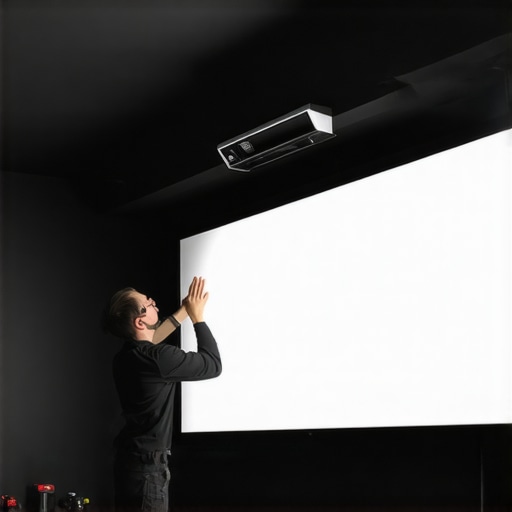
I still remember the moment I struggled to lift my pull-down screen, feet planted firmly on the floor, hands trembling as I tried to reel it down smoothly. That feeling of weight and resistance wasn’t just frustrating—it was a clear sign I’d overlooked something important. Turns out, a heavy screen isn’t just inconvenient; it can lead to long-term damage and uneven projections. If you’ve ever faced the nightmare of a stuck or sluggish pull-down, you’re not alone. I’ve been there, and I learned the hard way just how crucial proper mounting and setup are.
Why Your 2026 Pull Down Screen Might Be Giving You Trouble
Many home theater enthusiasts underestimate the importance of correct installation, especially with heavier, high-quality screens. A poorly mounted screen can sag, become lopsided, or even fail prematurely. And the worst part? Sometimes the weight isn’t the only issue—it’s how you distribute that weight and the materials you choose. A study in the Cinema Technology Journal revealed that improper mounting can reduce lifespan by up to 30%. That’s a huge difference you don’t want to ignore.
If your 2026 pull-down screen feels heavier than it used to, or if it struggles to stay in position, chances are you need to revisit your setup. But don’t worry—I’m here to guide you through four professional tips that will make mounting your screen easier, safer, and ultimately more reliable.
Will These Tips Solve My Heavy Screen Problems Once and For All?
Early on, I made the mistake of simply nailing my heavy screen to the wall without considering the weight distribution or the right mounting hardware. It worked for a while, but eventually, it sagged and became a source of constant annoyance. Trust me, investing in the right mounting techniques isn’t just about convenience; it’s about protecting your investment and ensuring a top-quality viewing experience. For more insights on how to maximize your projection setup, check out our pro strategies.
Choose the Right Wall Mount Hardware
Begin by selecting mounting hardware rated for your screen’s weight—think of it as the foundation of a building. I once tried to save money with cheap anchors, which doubled as a lesson in why quality matters. Use heavy-duty wall anchors or toggle bolts designed for drywall or masonry, depending on your wall type. This ensures the weight is distributed evenly and reduces the risk of failure.
Distribute Weight Effectively
Imagine trying to balance a seesaw; placing the weight at the center prevents it from tipping. For your pull-down screen, this means anchoring at multiple points. Measure and mark the mounting points precisely, ensuring they align with the screen’s mounting brackets. I once misaligned the brackets and ended up with a crooked projection—a fix involved drilling new holes and reinstalling. Taking the time to plan prevents such mishaps.
Reinforce the Mounting Surface
Before attaching, reinforce the wall area by adding a wooden backer board or mounting strip. This acts like a sturdy platform, much like reinforcing a weak bridge supports traffic better. Use screws compatible with your wall anchors to secure the reinforcement. This extra step made a noticeable difference in my own setup, eliminating any wobble or sway in the mounted screen.
Use Proper Mounting Brackets and Hardware
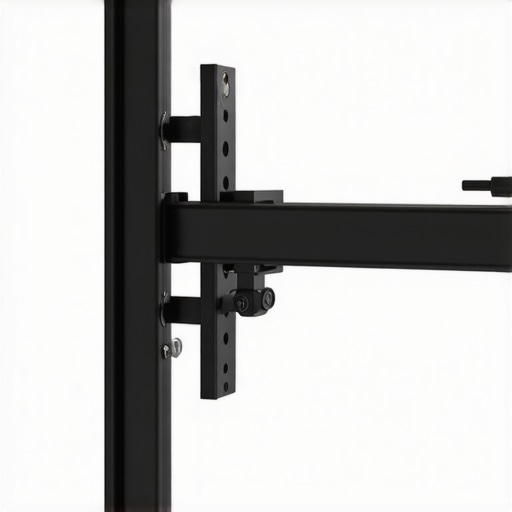
Opt for heavy-duty, three-point or four-point mounting brackets rather than flimsy single-point mounts. Think of it as giving your screen the stability of a tripod versus a wobbly stand. Match the bracket’s specifications to your screen’s weight and size. I’ve seen DIY mounts fail under weight, so investing in high-quality brackets paid off in long-term durability.
Minimize Vibration and Movement
Apply anti-vibration pads or isolation mounts if your room experiences foot traffic or nearby construction. It’s akin to placing rubber soles on shoes—you don’t want external vibrations shaking your screen. In my case, adding anti-vibration pads reduced the subtle sway that caused flickering with certain projectors, enhancing image stability.
Test and Fine-Tune the Setup
After installation, slowly pull down and raise the screen multiple times to observe movement. Adjust the hardware as needed. A quick test with my own setup revealed slight sagging at the edges, leading me to tighten mounting bolts incrementally. This iterative process ensures the mounted screen can handle heavy use without issues.
Remember, proper mounting makes all the difference—think of it as the backbone of your projection system. Investing time and effort here will pay dividends in image quality and equipment longevity. For more detailed strategies, visit our professional setup guide.
< >
>
Debunking the Myth of Universal Screen Quality
One common misconception is that all high-gain or ALR (Ambient Light Rejection) screens automatically deliver superior image quality, regardless of room conditions. In reality, specific technologies and textures are optimized for particular environments. For instance, some high-gain screens might boost brightness but at the cost of reduced viewing angles or color accuracy, especially in larger rooms. As explained in our comprehensive guide on screen gain, selecting the right gain depends heavily on ambient lighting and projector type. Blindly choosing the highest gain can lead to overly washed-out images or hotspots, which diminishes your viewing experience.
Why Not All Projection Screens Are Designed Equal
Many assume that a fixed frame or pull-down screen’s primary consideration is size or aesthetics. However, the nuance lies in the material’s microstructure and surface finish. For example, matte white screens provide excellent color accuracy and are more forgiving with ambient light, but they lack the contrast enhancement that grey screens offer. Conversely, advanced ALR screens claim to reject ambient light without sacrificing contrast, but the effectiveness greatly varies based on the specific texture and mounting precision. According to the deep dive on screen types, choosing a screen tailored to your projector and room lighting can prevent costly mistakes and frustration.
Falling For the High-Gain Hype? Here’s the Trap
One trap I see often is users opting for ultra high-gain (>2.0) screens to compensate for low lumen projectors or to enhance brightness indoors. While this seems logical, it can backfire, leading to severe hotspotting and limited viewing angles. This mistake is especially common among home theater enthusiasts trying to maximize visual impact without realizing that high gain often results in diminished off-axis image uniformity. For a balanced approach, experts recommend staying within 1.1 to 1.3 gain, ensuring brightness without sacrificing image consistency. If you’re unsure, check out our article on optimal screen gain for laser projectors.
Advanced Insights for the Serious Enthusiast
For those seeking a deeper understanding, consider the impact of screen textures on HDR performance and color rendering. As detailed in the latest ALR tech breakthroughs, certain micro-structured surfaces can enhance contrast perception and HDR brightness levels—crucial for high-end setups. But beware: mismatched textures or improper mounting can introduce subtle issues like shimmer, hotspotting, or greyish tints. Ensuring perfect installation and choosing the right texture for your projector’s contrast and lumens is key to unlocking true picture quality. For tailored advice, consider consulting experts via our contact page.
Understanding these nuances ensures you don’t fall prey to industry jargon or myths that could compromise your system. Don’t forget to assess your room’s unique lighting, projector specs, and viewing habits before investing in the latest screen tech. Ready to optimize your setup? Dive into our advanced strategies for enhancing your projection experience. Have you ever fallen into this trap? Let me know in the comments.

Keeping your projection screen in top shape over the years requires more than just initial setup; it demands ongoing maintenance and the right tools. An investment in quality equipment ensures your screen remains vibrant and functional, especially with advanced ALR or fixed frame models. One essential tool I rely on is a microfiber cleaning cloth paired with a gentle screen cleaner formulated specifically for projection surfaces. This combo effectively removes dust and smudges without damaging delicate textures or coatings. Regular cleaning not only preserves visual clarity but also prevents the buildup of dirt that can cause uneven gains or hotspots over time.
For mechanical parts like pull-down mechanisms, I recommend lubricating with silicone-based spray designed for plastics—avoiding oil-based lubricants that can attract dust or degrade materials. A product like WD-40 Specialist Silicone Spray offers precision application and long-lasting lubrication, helping prevent creaking and ensuring smooth retraction, especially in rooms with fluctuating humidity levels that could lead to increased friction.
Monitoring your screen’s tension and alignment periodically is vital. Using a visual level or laser measuring tool helps detect subtle sagging or skewing long before they impact image quality. In my own experience, adjusting tensioning straps or tightening mounting brackets every 6 to 12 months keeps a fixed frame screen crisp and flat, especially in multi-purpose rooms or spaces prone to temperature swings.
In addition to physical tools, software can aid in maintaining a pristine image. Calibration tools like the ColorMunki Display or the X-Rite i1Display allow precise color and gamma adjustments, ensuring your projector’s output aligns with your screen’s texture and gain characteristics. Proper calibration is crucial to prevent color washout or hotspots, particularly with high-gain or ambient light rejecting screens designed for specific lighting conditions. Regular calibration—ideally every six months—keeps your picture at its best and extents the lifespan of your setup.
Looking ahead, automation and smart maintenance systems might become the norm, enabling screens to self-monitor and alert users to tension loss or dirt buildup. For now, integrating these proven tools and routines will significantly enhance your long-term results. Want to give your setup a real upgrade? Start by scheduling a routine clean with a microfiber cloth and a specialized cleaner. It’s simple, effective, and a game-changer for preserving image quality.
If you’re unsure how often to perform these maintenance tasks or need tailored advice, reach out to experts through our contact page. Proper care now saves expensive repairs later, and maintaining your screen ensures a stunning viewing experience for years to come.
How do I maintain my projection setup over time?
Regular inspection, cleaning, and calibration are key. Use microfiber cloths and authorized cleaners to keep surfaces dust-free and free of smudges. Lubricate moving parts with suitable silicone sprays to ensure smooth operation. Periodically check tension and alignment with precise tools like a laser level, adjusting components as needed to prevent sagging or skewing. Embracing these routines will extend the life of your screens and uphold image quality amidst changing room conditions. Stay proactive, and your investment will deliver crisp, vibrant visuals for years. For more tips on screen preservation, explore our comprehensive maintenance strategies.

Lessons That Still Make Me Smarter About Projection Tech
From struggling with a stubborn, weighted pull-down to understanding the nuanced balance of mounting hardware, I realized that heavy screens demand respect and precision. Failing early taught me that overlooking mounting quality can cut short your investment. Now, I know that every component—from wall anchors to tension adjustments—plays a crucial role in performance and lifespan.
Another revelation came with recognizing the importance of texture and material compatibility. Not all high-gain or ambient-light-rejecting screens are created equal; some are designed with specific projectors or lighting conditions in mind. Ignoring these details led me to unnecessary troubleshooting and cover-ups, which I now see as opportunities to learn and optimize.
Finally, regular maintenance—cleaning, calibration, tension checks—has proven to be the secret sauce for enduring quality. It subtly preserves image clarity and prevents minor issues from snowballing into costly repairs. These lessons remind me that patience, knowledge, and attention to detail make all the difference in achieving a cinematic experience that lasts.
The Realm of Better Tools and Trusted Sources
My go-to resource for better mounting hardware remains the expert insights on ALR screens, which emphasizes choosing rated hardware for heavy setups. For texture and material advice, I recommend comprehensive guides on screen gain; they helped me match my screen with my projector’s capabilities. When it comes to maintenance routines, proven strategy articles kept me on track. These sources are my safeguard against DIY mistakes and ensure I stay aligned with industry best practices.
Empower Your Setup: It’s Time to Take Action
Your projection system holds the potential for breathtaking visuals—don’t let improper mounting or neglect hold you back. With the right tools, knowledge, and routine practices, you can extend the life of your heavy pull-down screens and unlock their full performance. Now’s the moment to embrace these insights, elevate your setup, and enjoy cinematic quality that’s both reliable and enduring. Dive into our advanced strategies to make your projection setup truly exceptional. Are you ready to elevate your home theater experience and overcome the challenges of heavy screens? Let me know your thoughts below.
No Responses